
Master Your Money. Privately.
See where every penny goes, catch forgotten subscriptions, and plan ahead — with your financial data stored on your device, not someone else's server.
Complimentary Pro+ Unlocked During Beta • No Credit Card Required
Complete the 5-Chapter Beta Quest to earn 50% lifetime discount →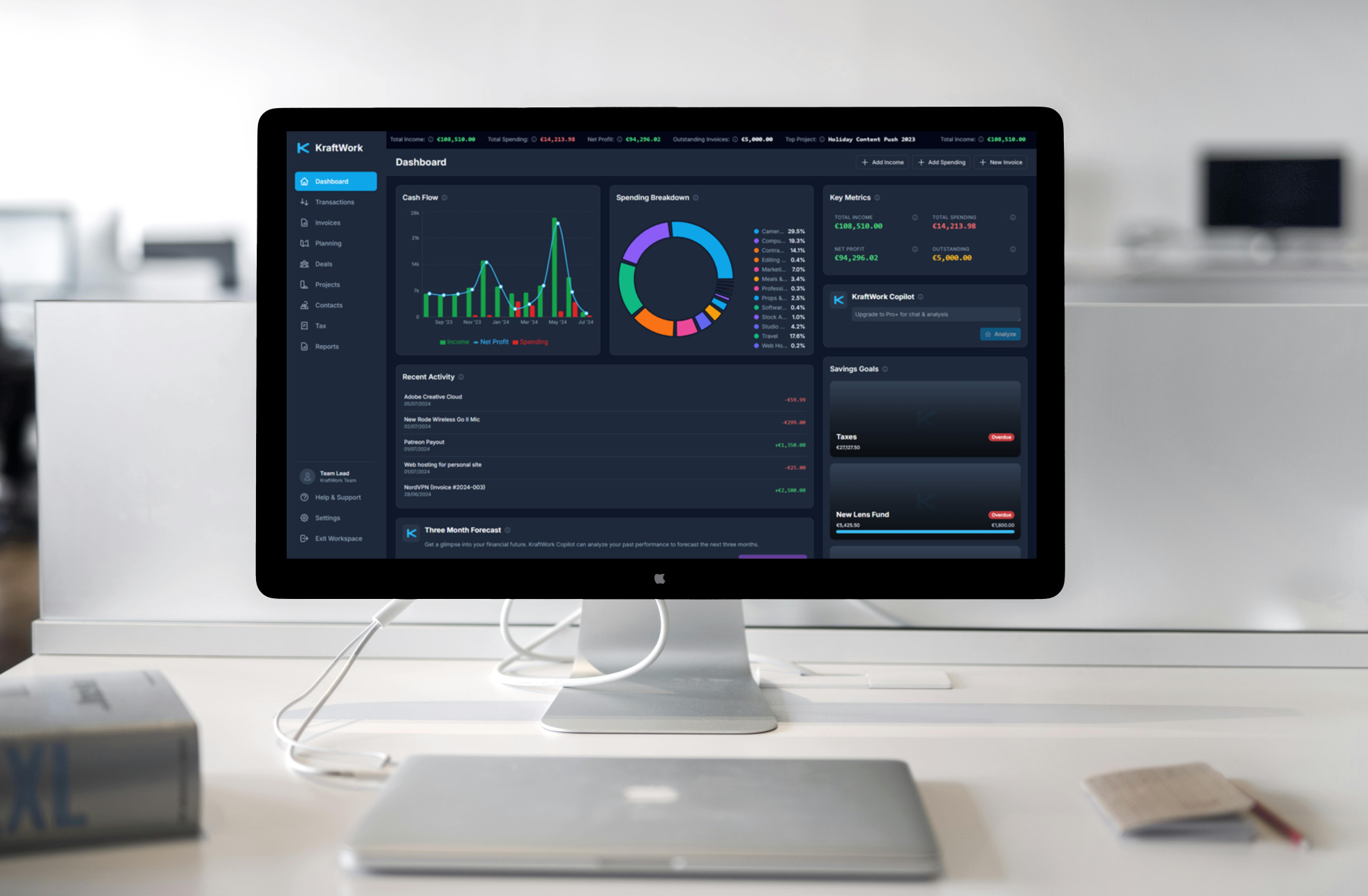
Clear answers to your money questions in minutes.
Most finance apps are just complex spreadsheet viewers. KraftWork is built to give you immediate, actionable clarity from day one.
Find every subscription you're paying for in 60 seconds
Drop in your latest bank statement. Subscription Guard scans your recurring charges, calculates total commitment drag, and uncovers forgotten charges instantly.
Know what's safe to spend until payday
Stop guessing if you can afford that purchase. KraftWork accounts for upcoming bills and goal contributions, so you always know your true daily spending cushion.
See where your money will be in 3 months
AI-assisted cash flow projections analyze past spending patterns to forecast your net worth and cash balance 90 days out, spotting potential shortfalls before they happen.
Hit your savings goals with visual Savings Jars
Car repairs, emergency funds, or your next holiday aren't surprises when planned in advance. Allocate savings toward dedicated virtual jars and watch progress grow.
Master Your Money in a Single Command Center
See KraftWork in action.
Up to date in minutes a week, without handing your bank login to anyone.
Most "connect your bank" features route your entire transaction history through data brokers and the app's own servers. That's two more companies holding your financial life.
KraftWork doesn't do that. Instead, we've made keeping your money up to date fast enough that you won't miss it, and your data never leaves your device.
Statement import
Drop in a CSV or PDF from your bank. A whole month lands in seconds, completely offline.
Receipt capture
Snap a photo of a receipt and KraftWork turns it into a transaction.
Smart rules
KraftWork learns your categories, so you set things up once and they stay sorted.
Payment notifications
SoonComing soon on Android: tap to pay, and a draft transaction appears, read privately on your phone.
How KraftWork Compares
Fair comparison with the top personal finance tools. We trade automatic bank scrapers for complete data privacy and a generous free tier.
| Feature | KraftWork | YNAB | Monarch Money | Copilot Money |
|---|---|---|---|---|
| Free Permanent Plan | Yes (Full core toolkit) | No (34-day trial only) | No (7-day trial only) | No (trial only) |
| Price | Free, or $6 – $12/mo | $14.99/mo ($109/yr) | $14.99/mo ($99.99/yr) | $13.00/mo ($95/yr) |
| Where Your Data Lives | On your device (Local-first) | Corporate cloud database | Corporate cloud database | Corporate cloud database |
| Works Without an Account | Yes (No login required) | No (Email & password) | No (Email & password) | No (Account required) |
| Automatic Bank Sync | No (Privacy-first CSV/PDF) | Yes (Aggregators) | Yes (Aggregators) | Yes (Aggregators) |
| Supported Platforms | Web, iPhone, Android, Mac, Windows | Web, iOS, Android | Web, iOS, Android | Apple ecosystem & Web |
| AI Financial Coach & Forecast | Yes (Pro+ Copilot & 90-day forecast) | No | Basic Assistant | Intelligence Engine |
* Competitor pricing and feature data checked October 2026 from public documentation and plan details. Trademarks belong to their respective owners.
Why I Built KraftWork
Like millions of people, I wanted a modern personal finance app that gave me clarity on my spending, subscriptions, and future without handing the keys to my financial life to third-party data brokers.
Most mainstream finance apps quietly make money by aggregating, packaging, and selling user spending habits. Connecting a bank usually means routing all your transactions through corporate cloud databases that can be breached, tracked, or shut down.
KraftWork was born from a simple belief: your money is your business. By keeping your financial database on your own device and making statement imports lightning fast, you get all the insight of a modern financial assistant with absolute privacy.
Explore What's Included
From an essential privacy-first toolkit to your very own AI-powered money coach.
Your powerful, private, and permanently free command center.
- Unified Financial Dashboard
- Account Balance Checker
- Income & Spending Tracker
- Budgets & Category Limits
- Savings Jars (Sinking Funds)
- Live Financial Ticker
- Subscription Guard (Auto-Detect)
- Smart CSV Data Import
- Private On-Device Storage
One subscription.
Your whole household.
Many finance apps lock you to one device, or charge extra to share with your partner. KraftWork doesn't. Use it on up to 5 devices, all kept in sync, for one simple price.
- Up to 5 devices on a single Pro or Pro+ subscription
- No extra seats, family add-ons or per-device fees
- Synced privately through your own Google Drive or Dropbox
Find the Right Plan for You
KraftWork is currently in Public Beta. Test all Pro and Pro+ features 100% free with no credit card. Complete the Beta Quest to lock in a 50% lifetime discount on yearly plans when we launch!
Free
- Unlimited Accounts & TransactionsTrack checking, savings, credit cards, investments, and cash balances with no artificial limits.
- Budgeting & Savings GoalsSet monthly spending limits by category and create visual 'Savings Jars' with custom automatic allocations.
- Bills & Subscription TrackingTrack recurring utility bills, monthly subscriptions, and get timely alerts before money leaves your account.
- Smart CSV Data ImportImport bank statement CSVs with intuitive column mapping directly into KraftWork's structure.
- No Ads or Data Selling
Pro
(or $60/year — 2 months free!)
- Everything in FreeUnlimited Accounts & Transactions, Budgeting & Savings Goals, Bills & Subscription Tracking, Smart CSV Data Import, No Ads or Data Selling
- Sync Across 5 DevicesOne subscription, up to 5 devices: laptops, desktops, phones and tablets for your whole household. Synced privately through your own Google Drive or Dropbox. No extra seats, no per-device fees.
- AI Subscription GuardAI powered engine scans transaction history for recurring monthly & annual subscriptions, tracks price creep, and gives you cancellation links.
- AI Receipt ScanningUpload photo receipts and let AI automatically extract the merchant, transaction date, amount, and category.
- AI Category SuggestionSave time during manual entry with an AI that suggests categories based on transaction descriptions.
- Smart PDF Statement ImportUpload PDF bank statements and let AI automatically parse and extract transaction tables into your ledger.
Pro+
(or $120/year — 2 months free!)
- Everything in Free and ProUnlimited Accounts & Transactions, Budgeting & Savings Goals, Bills & Subscription Tracking, Smart CSV Data Import, No Ads or Data Selling, Smart Cloud Sync (up to 5 devices), AI Subscription Guard, AI Receipt Scanning, AI Category Suggestion, Smart PDF Statement Import
- Sync Across 5 DevicesOne subscription, up to 5 devices: laptops, desktops, phones and tablets for your whole household. Synced privately through your own Google Drive or Dropbox. No extra seats, no per-device fees.
- AI Dashboard Analysis & ChatChat directly with your financial coach to ask questions, summarize monthly habits, and get spending summaries.
- AI Financial ForecastingGenerate cash flow projections and net worth trends for the next three months using past trends.
- AI Budget RecommendationsGet smart, custom-tailored monthly budget advice based on your current savings rate and goals.
- Maximum AI Copilot AccessUnlock the highest tier of API access to our most advanced models for unrestricted chatting, forecasting, and receipt scanning.
Install in Seconds. No App Store Needed.
KraftWork runs directly from your browser and can be saved to your home screen or dock in two taps. It loads instantly and works offline.
- Open KraftWork in Safari on your iPhone or iPad.
- Tap the Share button (the square with an arrow pointing up) at the bottom.
- Scroll down and tap "Add to Home Screen", then tap Add in the top-right corner.
Latest from the Blog
Insights on privacy, personal finance, and the future of local-first software.
Why KraftWork Doesn't Have Bank Sync (And Why We're Okay With That)
Automatic bank sync feels like magic, but it means handing your financial life to data brokers. Here's our honest take, and how KraftWork keeps you up to date in minutes a week without it.
Read ArticleGive Every Dollar a Job: How KraftWork Empowers Zero-Based Budgeting
Discover why proactive methodologies like Zero-Based Budgeting and the Envelope Method are the secret to financial success, and how KraftWork is built to facilitate them.
Read ArticleWhy KraftWork's Free Tier is Actually Free (And Why Pro is Cheaper)
Most finance apps cripple their free tiers to force you into a subscription. Learn why we give away our core engine for free, and how we price our premium AI features.
Read ArticleFrequently Asked Questions
When you select the Pro+ plan, you start with a 7-day free trial ($0 due today). You get immediate access to all premium features including the AI Coach, financial forecasting, and budget recommendations. Stripe securely processes your checkout, and will automatically send you an email reminder 3 days before the trial ends. You can cancel at any time before day 7 with zero charge.
Your financial data is stored locally on your device in your browser's private database. We don't host a central database of your transactions or balances. Cloud sync is optional and powered by your own Google Drive or Dropbox. When you choose to use AI features, only the data required for your specific question is securely sent to our AI provider (Google Gemini) and is never used to train models.
You can verify this directly in your browser. Open your browser's Developer Tools (press F12 or right-click anywhere and select 'Inspect'), switch to the Network tab, and use KraftWork. With AI features and cloud sync disabled, you will see zero network requests transmitting your financial data. Everything stays strictly inside your device's IndexedDB storage.
No. KraftWork is designed to be account-less. Your data is tied to your device, providing an extra layer of privacy.
Automatic bank sync almost always routes your full transaction history through third-party data brokers and the app's own servers, which goes against our promise that your data never leaves your device. Instead, you can import a bank statement (CSV or PDF) in seconds, snap receipts, and let smart rules categorise everything. Automatic capture of payment notifications on Android is coming soon, processed entirely on your phone.
In the app's settings, you can export your entire workspace to a single JSON file. We recommend doing this regularly and storing the backup in a safe place like a cloud drive or external hard drive.
We use Stripe for secure payment processing. When you subscribe, Stripe provides a local license key that is activated directly on your device. This verifies your Pro status securely with our backend without ever linking your personal identity or financial records to a cloud database.
Yes! With Pro or Pro+, one subscription covers up to 5 devices in total, enough for a whole household: a shared computer plus each person's phone, tablet or work laptop. Smart Cloud Sync keeps them all in step through your own Google Drive or Dropbox, with complete zero-knowledge privacy. No extra seats, no per-device fees. On the Free plan, you can still export a backup file and open it on any number of devices; it just won't sync automatically.
Absolutely. We believe your data should never be locked in. While the primary backup function saves your entire workspace, you can go to the Reports page to export your income and spending ledgers as standard CSV files.
No. The insights, forecasts, and advice provided by the KraftWork AI Coach are generated by an AI model for informational purposes only and do not constitute financial, investment, legal, or tax advice.
KraftWork runs on iPhone, iPad, Android, Mac, Windows, and Linux — anywhere with a modern web browser. You can install it directly to your home screen or desktop in two taps for a fast, full app experience with no app store downloads or gatekeepers required.
Stay in the loop
Get occasional product updates, privacy tips, and new feature announcements. Never spam, and your email is never sold.
By subscribing, you agree to our . Unsubscribe anytime.
Ready to Take Control of Your Finances?
Test the complete private financial toolkit free during our public beta. Complete the Beta Quest to earn your 50% lifetime discount.
Complimentary Pro+ unlocked • No account • No credit card required
or start a 7-day free trial of Pro+ ($0 due today) →